Permissions Setup
1. Overview
This document focuses on how to register the required permissions in a React Native or Expo project
Detailed explanations of why each permission is required and how native permission detection works are covered in the platform-specific documentation:
- iOS SDK – Permissions Setup
- Android SDK – Permissions Setup
2. Required permissions by platform
Because the React Native & Expo SDK delegates all permission handling to the native SDKs, all mandatory permissions defined in the iOS and Android SDKs still apply.
2.1 iOS
On iOS, the application must be configured with:
- Location (When In Use)
- Location (Always)
- Motion
- Background Mode – Location updates
These permissions and capabilities must be configured in the iOS project, exactly as described in the iOS SDK documentation.
The React Native layer does not request or manage iOS permissions directly.
2.2 Android
On Android, the application must declare and request:
- Foreground location permissions
- Background location permissions (when applicable)
- Motion / activity recognition permissions
- Notifications (Android 13+)
- Battery Optimization off
These permissions must be configured in the Android project, exactly as described in the Android SDK documentation.
3. Registering permissions in a React Native project
In a React Native application, permissions are registered directly in the native project files. The JavaScript layer does not define or request permissions.
All required configuration must be done inside the iOS and Android folders of the React Native project.
3.1 iOS (React Native)
All iOS permissions must be registered in the native iOS project located at ios/.
Configure Info.plist
Locate the Info.plist file at ios/YourApp/Info.plist and add the following Key–Value pairs inside the <dict> block:
<key>NSLocationWhenInUseUsageDescription</key>
<string>Your explanation.</string>

<key>NSLocationAlwaysAndWhenInUseUsageDescription</key>
<string>Your explanation.</string>

<key>NSMotionUsageDescription</key>
<string>Your explanation.</string>
Each key must have a string value. This value is the message shown to the user when iOS requests the permission.
Enable background location execution
Continuous telemetry requires background execution while receiving location updates. Ensure the following entry exists in Info.plist:
<key>UIBackgroundModes</key>
<array>
    <string>location</string>
</array>
Configure permissions in Podfile
If the project uses CocoaPods, the required iOS permissions must also be declared in the Podfile. Open ios/Podfile and ensure the following configuration is present:
...

target 'YourApp' do
  config = use_native_modules!

  use_react_native!(
	:path => config[:reactNativePath],
	:app_path => "#{Pod::Config.instance.installation_root}/.."
  )

  # ----- iOS PERMISSIONS -----
  setup_permissions([
	'LocationWhenInUse',
	'LocationAlways',
	'Motion',
  ])
  # ------------------

  ...
This step ensures that the required native permission handlers are correctly linked during the iOS build process.
Below you can see an example of where the content mentioned should be added:
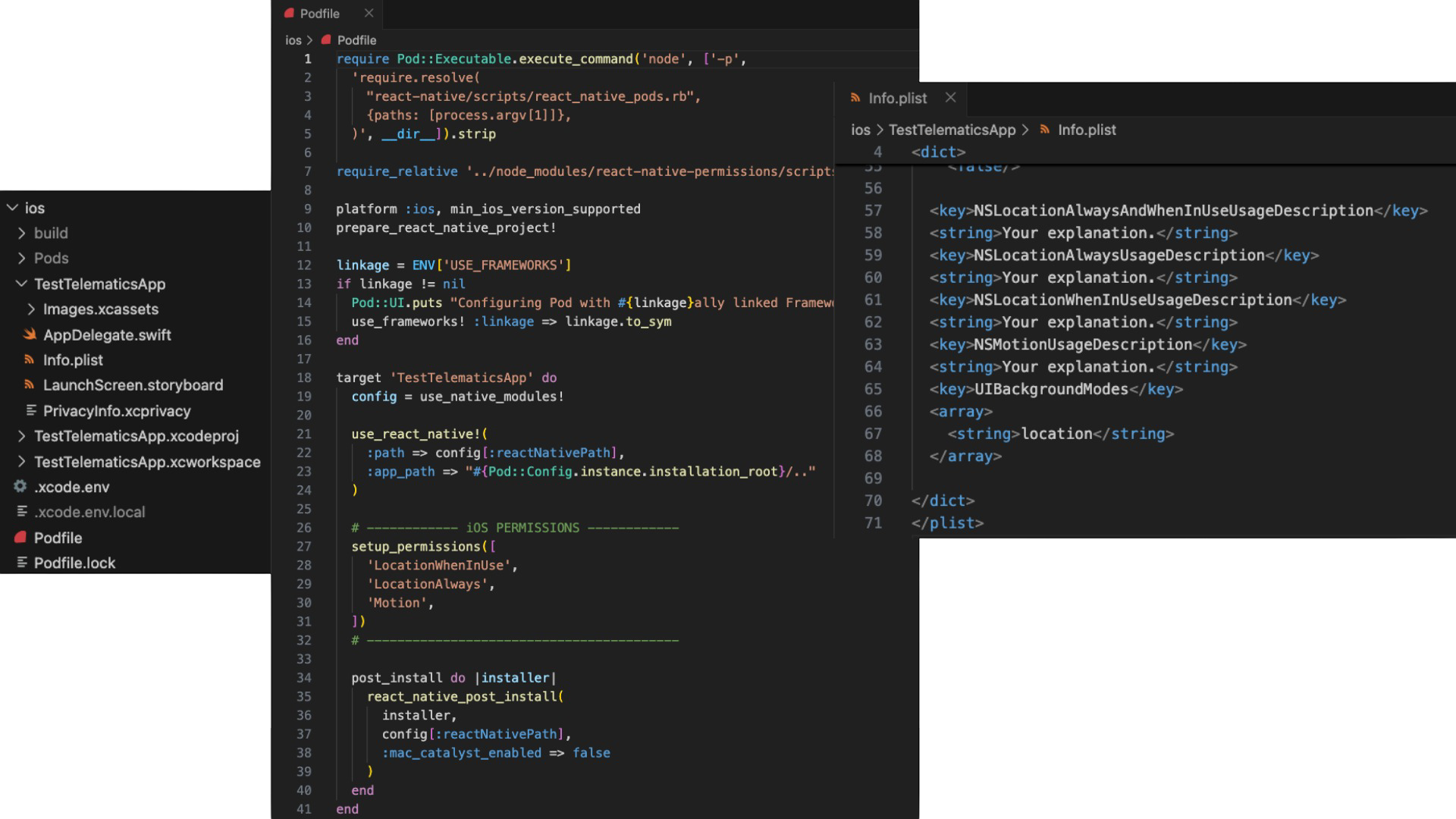
Image 1 - Podfile and Info.plist example
Note:
Only thesetup_permissions([...])block is relevant in thePodfile. The rest of the file is standard project configuration.
3.2 Android (React Native)
All Android permissions must be registered in the native Android project located at android/.
Configure AndroidManifest.xml
Open the main manifest file, typically located at android/app/src/main/AndroidManifest.xml.
Add the following permissions inside the <manifest> tag:
<uses-permission android:name="android.permission.ACCESS_FINE_LOCATION" />
<uses-permission android:name="android.permission.ACCESS_COARSE_LOCATION" />
<uses-permission android:name="android.permission.ACCESS_BACKGROUND_LOCATION" />
<uses-permission android:name="android.permission.ACTIVITY_RECOGNITION" />
<uses-permission android:name="android.permission.FOREGROUND_SERVICE" />
<uses-permission android:name="android.permission.FOREGROUND_SERVICE_LOCATION" />
<uses-permission android:name="android.permission.POST_NOTIFICATIONS" />
These permissions are required for foreground and background location tracking, motion detection, and long-running telemetry services. On Android 13 and higher, the Notifications permission must also be granted at runtime for telemetry to start.
Below you can see an example of where the content mentioned should be added:
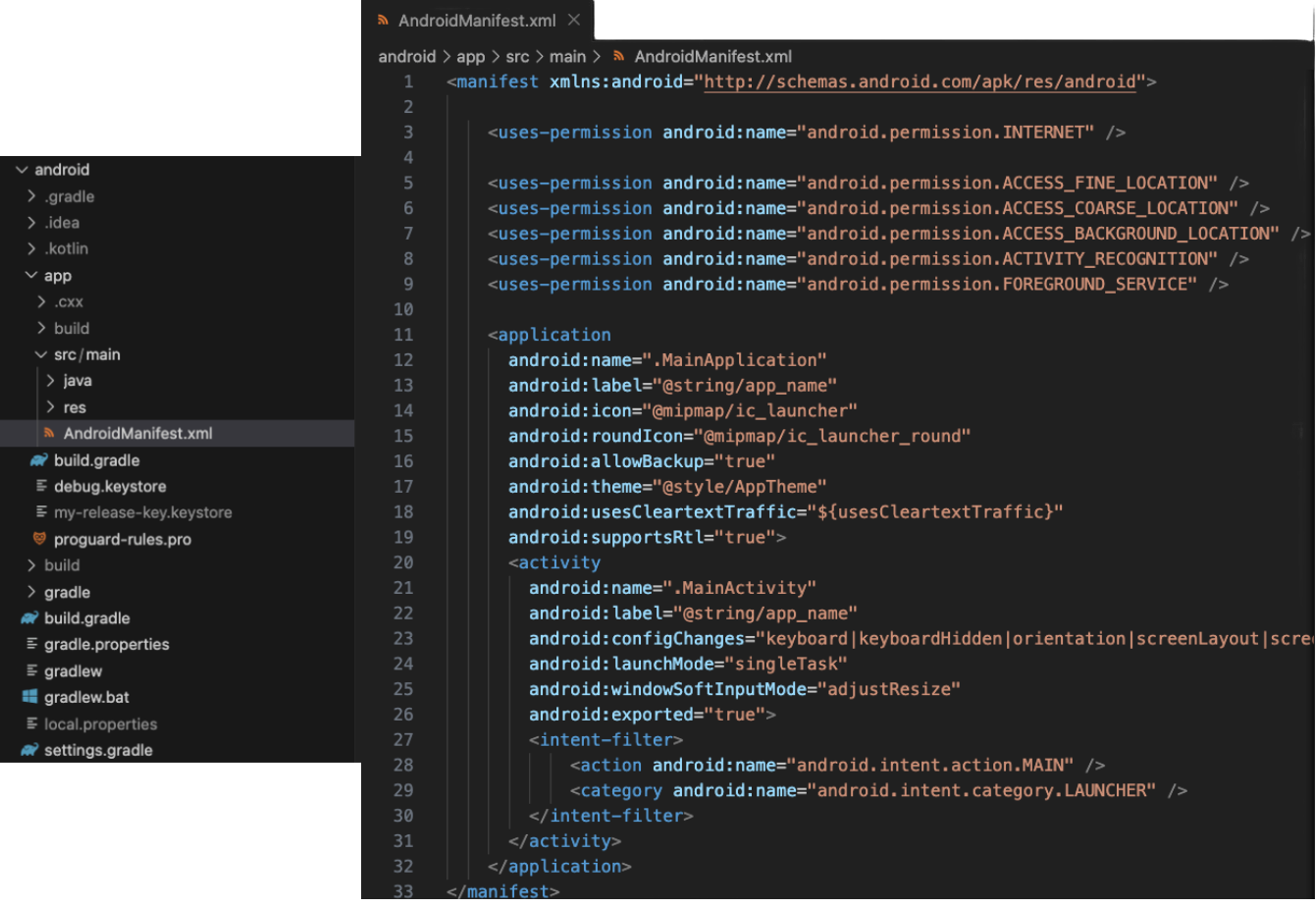
Image 1 - AndroidManifest.xml example
Note:
Only theuse-permissionlines are relevant in theAndroidManifest.xml. The rest of the file is standard project configuration.
Battery optimization
On Android, battery optimization must be disabled for the application in order for telemetry to work. If battery optimization remains enabled, the SDK will not allow the telemetry to start.
Detailed handling of battery optimization is covered in the Android SDK documentation.