Permissions Setup
1. Required permissions
For the Telematics SDK to function consistently, the application that integrates it must guarantee a specific set of permissions and system settings. These permissions are not optional, as each one plays a distinct role in telemetry collection reliability.
On Android, consistent telemetry depends on the ability to collect precise location, keep tracking active in the background, access activity recognition, and run long-lived work using the appropriate foreground service model.
1.1 Location (Fine)
android.permission.ACCESS_FINE_LOCATION
The Fine Location permission grants access to high-accuracy location (GPS-level). This permission is mandatory for reliable telematics, as the SDK requires accurate positioning to build consistent trips and correctly infer driving behavior.
Without this permission:
- location accuracy is significantly degraded
- trip reconstruction becomes unreliable
- telemetry quality and event detection are impacted
1.2 Location (Coarse)
android.permission.ACCESS_COARSE_LOCATION
The Coarse Location permission grants access to approximate location. Although the SDK primarily relies on fine location for accuracy, coarse location is still required as part of Android’s permission model and as a fallback in scenarios where fine accuracy is temporarily unavailable.
Without this permission:
- the system may restrict location access in some configurations
- the application cannot gracefully fall back to approximate location when needed
1.3 Background Location
android.permission.ACCESS_BACKGROUND_LOCATION
Background Location permission allows the application to receive location updates while it is not in the foreground. For continuous driving telemetry, this permission is mandatory.
Without this permission:
- the system restricts background location updates
- continuous trip collection is interrupted when the app leaves the foreground
- telemetry becomes incomplete or fragmented
Important:
Starting with Android 10 (API 29), background location is governed by stricter system rules. The user must explicitly grant background location access following Android’s required permission flow.
Declaring the permission in the manifest is not sufficient on its own.
1.4 Activity Recognition
android.permission.ACTIVITY_RECOGNITION
Activity Recognition permission allows access to motion and activity signals that help the SDK classify movement patterns and detect driving-related behavior more reliably.
This permission complements location telemetry by enabling:
- improved detection of driving events
- better classification of motion states
- enrichment of telemetry samples
Without this permission:
- the SDK may still collect location, but behavior classification is less accurate and less robus
1.5 Foreground Service
android.permission.FOREGROUND_SERVICE
Foreground Service permission is required to run long-running work in a way that the system allows and keeps alive under modern Android background execution restrictions.
The SDK relies on foreground execution patterns to ensure continuous telemetry collection under system constraints.
Without this permission:
- background execution may be restricted or terminated more aggressively
- telemetry collection cannot be reliably sustained during long trips
1.6 Notifications (Android 13+)
android.permission.POST_NOTIFICATIONS
While telemetry is running, the SDK runs a foreground service that must show a persistent notification. Starting with Android 13 (API 33), the user must grant the Notifications permission at runtime.
On Android 13 and higher this permission is mandatory: if it is not granted, the SDK reports it as missing and will not start telemetry.
1.7 Battery optimization
In addition to permissions, battery optimization must be disabled for the application for telemetry to work reliably. If battery optimization remains enabled, the system may restrict background execution and the SDK may not be able to keep telemetry running consistently.
Telemetry behavior
On Android, telemetry only starts if all mandatory permissions and system requirements are fully satisfied.
If any required permission is missing, or even if battery optimization is enabled, the SDK will not start telemetry.
The SDK does not run in a degraded or partial mode.
1.8 Granted permissions example
The following example shows a correct permission state for an application integrating the Telematics SDK. All mandatory runtime permissions are granted, including Physical Activity and Location with the level “Allowed all the time”, ensuring that the SDK can access motion and location data both in the foreground and in the background:
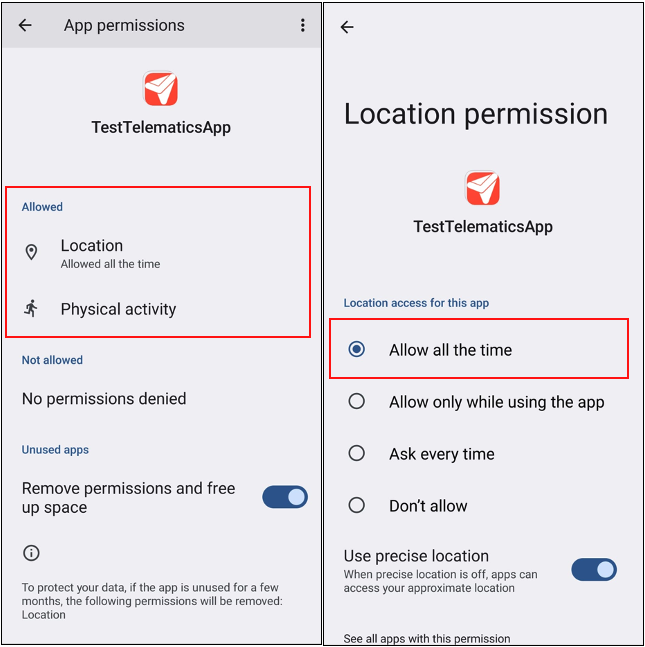
Image 1 - Required permissions example
The second example shows the required battery configuration. Battery optimization is disabled and the application is set to “No restrictions”, allowing the system to keep telemetry running without background execution limits:
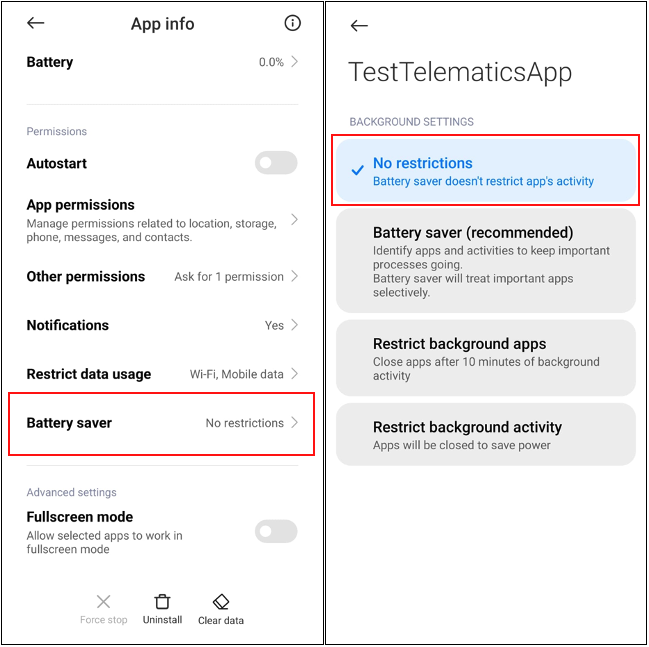
Image 2 - Disabled battery otimization
2. Enable Capabilities
Now that the required permissions and system requirements are defined, this section explains how to configure them in your Android project.
2.1 Configure AndroidManifest.xml
In Android Studio, open your application module and locate the manifest file:
app/src/main/AndroidManifest.xml
Add the following permissions inside the <manifest> tag:
<uses-permission android:name="android.permission.ACCESS_FINE_LOCATION" />
<uses-permission android:name="android.permission.ACCESS_COARSE_LOCATION" />
<uses-permission android:name="android.permission.ACCESS_BACKGROUND_LOCATION" />
<uses-permission android:name="android.permission.ACTIVITY_RECOGNITION" />
<uses-permission android:name="android.permission.FOREGROUND_SERVICE" />
<uses-permission android:name="android.permission.FOREGROUND_SERVICE_LOCATION" />
<uses-permission android:name="android.permission.POST_NOTIFICATIONS" />
These declarations register the permissions at the manifest level, allowing the app to request them at runtime.
2.2 Disable battery optimization
For telemetry to work reliably, the application must be excluded from battery optimization.
In Android Studio, there is no single manifest flag that guarantees this behavior. Battery optimization is controlled by the system and requires user approval in the device settings.
Your application must guide the user to disable battery optimization for the app, otherwise background execution and continuous telemetry may be interrupted.
After completing these steps, the application is correctly configured to request the required permissions and to support continuous background telemetry.
2.3 Example
Here you can see an example of where to add the permissions in AndroidManifest.xml in Android Studio:
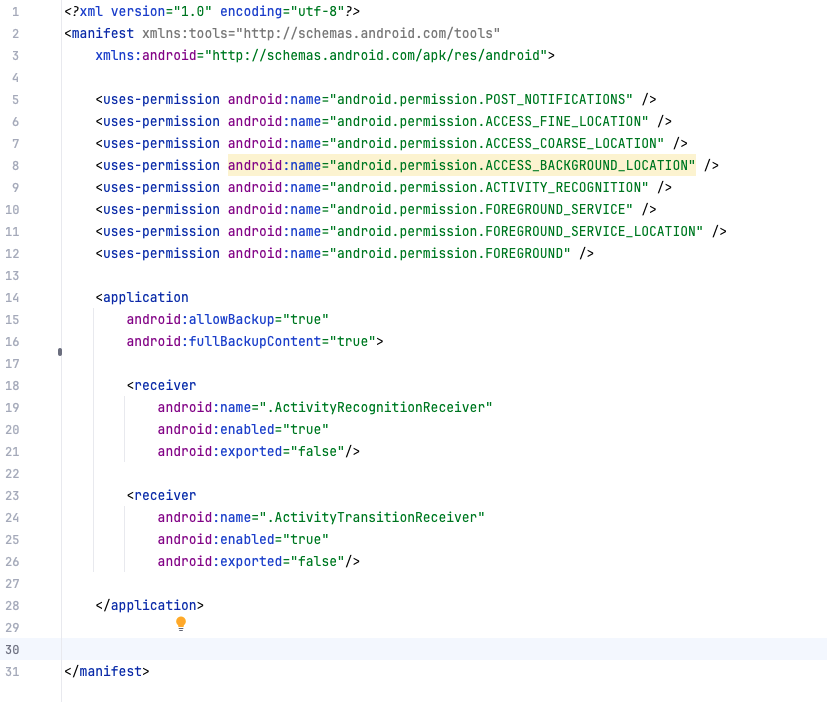
Image 3 - AndroidManifest.xml example